Minecraft PC IP: play.cubecraft.net
  • We're running an internal migration of all old players' stats to our new highly advanced statistics tracking backend. This means that stat changes will be a bit delayed while we ingest this huge backlog of data. Nothing is being lost, it'll just take a bit longer to show up in the in-game UIs.
Status
Not open for further replies.

Marieke2001

Forum Legend
Jul 2, 2015
4,119
15,536
719
I've a new laptop, so I had to install OBS again, but when I watch my videos back, they're blurry.
As excample:

Is there anyone who can help me?
Idk in which section I had to place this thread xd.
 

TheAsdfDude

Well-Known Member
Apr 8, 2016
56
3
83
NJ
www.youtube.com
Easy fix. Raise the bitrate and video dimensions. Its set to 2,500 for streaming/recording but that is low for video quality and youtube's compression doesn't help it. Go here for more info on recommended bitrates per type and framerate. Hope this helps! :D
*Edit: Just reread the link I posted andYTt's recommended settings for 480p is 2.5 mbps which is 2,500 on obs. I'll look into it more :confused1: My settings are set to 10000 for the bitrate, 1080p@60fps.
Also, are you using OBS or OBS Studio? And what laptop are you using to record?
 
Last edited:

HackersDontWin

Partner
🤝 Partner 💜
Easy fix. Raise the bitrate and video dimensions. Its set to 2,500 for streaming/recording but that is low for video quality and youtube's compression doesn't help it. Go here for more info on recommended bitrates per type and framerate. Hope this helps! :D
*Edit: Just reread the link I posted andYTt's recommended settings for 480p is 2.5 mbps which is 2,500 on obs. I'll look into it more :confused1: My settings are set to 10000 for the bitrate, 1080p@60fps.
Also, are you using OBS or OBS Studio? And what laptop are you using to record?
3500 bitrate is enough? lol.

I don't use OBS that much except for livestreaming, and I have my bitrate on 3500. Now I have no idea if that depends whether you're recording or livestreaming. Also another note is make sure to have the Base Resolution set to 'Custom: 1920 1080' for 1080p footage, and set FPS to 60 if you want that too.
1080p.png


If this didn't help, then I don't know what fixes it, but I have it like that for livestreaming
 

silverguy123

Well-Known Member
Aug 24, 2016
35
3
84
36
i use shadowplay its good but if you have a lot of cpu it will make you lagg a little bit(not ing in the record)
 

TheAsdfDude

Well-Known Member
Apr 8, 2016
56
3
83
NJ
www.youtube.com
I'm using OBS and my laptop is a Lenovo ideapad 700. Idk if it matters but i've a geforce gtx 950M videocard.
I asked because I'm using OBS Studio and some of the settings are different between the two. I was wondering what laptop it was to determine if you'd be able to run higher settings, As I've stated before, its the bitrate that makes it look grainy. you dont need it over the recommended settings for YouTube, because they will just lower it for more optimized streaming. Also make sure the output container is .mp4. That needs to be changed from the stock settings I believe.
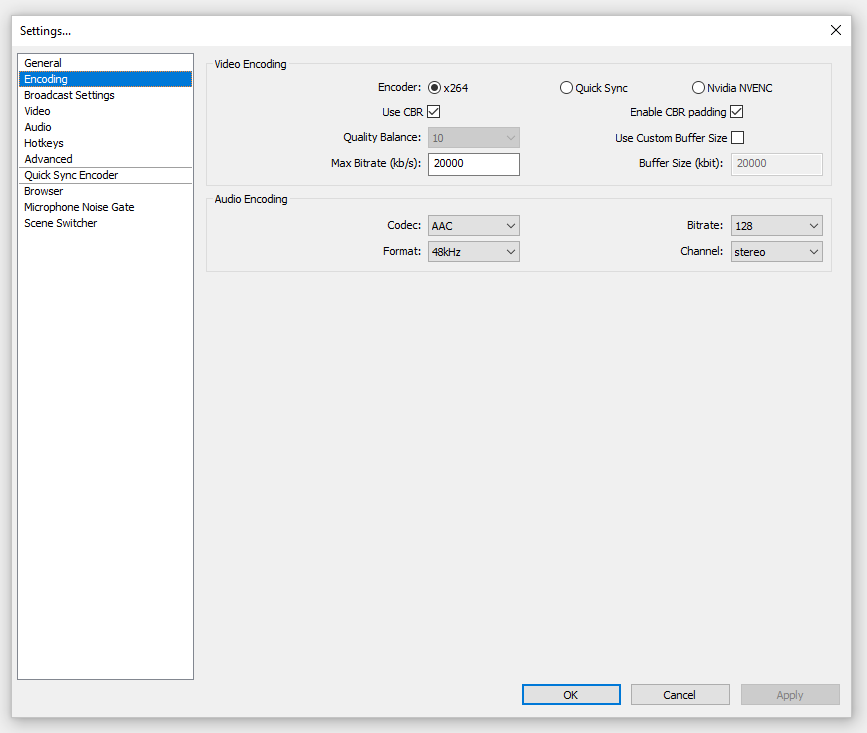
These are my settings. I use the h.264_nvec encoder because I have an Nvidia 1060 GPU in my laptop. It reduces the strain on the cpu for video encoding. I'd suggest you look for a setting like that. Should say Nvidia NVENC in OBS.
3500 bitrate is enough? lol.
3,500kbps is good for streaming, yes, but not for videos :p I'll provide proof in a few days if this thread doesn't get locked.
 

Attachments

  • Screenshot (1).png
    Screenshot (1).png
    91.2 KB · Views: 197

Marieke2001

Forum Legend
Jul 2, 2015
4,119
15,536
719
Easy fix. Raise the bitrate and video dimensions. Its set to 2,500 for streaming/recording but that is low for video quality and youtube's compression doesn't help it. Go here for more info on recommended bitrates per type and framerate. Hope this helps! :D
*Edit: Just reread the link I posted andYTt's recommended settings for 480p is 2.5 mbps which is 2,500 on obs. I'll look into it more :confused1: My settings are set to 10000 for the bitrate, 1080p@60fps.
Also, are you using OBS or OBS Studio? And what laptop are you using to record?
10000 bitrate worked, thanks everyone for the help! :D

Lock please :). @zDutchie
 
Status
Not open for further replies.
Members Online

Team online

Members online

Latest profile posts

Quewds wrote on Noodles.'s profile.
Found you 🌹
kevin020007 wrote on B4CKROOMS's profile.
Thanks for the follow!
HOTROD the 6th wrote on Daanfkyy's profile.
Congrats on bedrock helper, hope you succeed!
ItzJuan wrote on Marta's profile.
🫡 Thank you for all the hard work you've done. We'll never forget you.
HelmutRebew wrote on Alexp192's profile.
Thanks for the follow!
Top Bottom